Today's session focussed on devices. Unfortunately we couldn't connect with Dorothy for a hangout session this morning, so Maria took us through the 'Being Cybersmart' component. It was good to get an insight into the thought behind this - being Cybersmart, empowering student voice through digital citizenship, celebrating being internet awesome - all positive messages for our learners. It is about empowering "confident, connected and actively involved, lifelong learners". It was also remembering that learning that we share online always being visible. Also blog comments need to be positive, helpful and thoughtful.
I like the graphic below and would like to share this on our class site, as a reminder for the children when commenting on other learners' blogs.
Next we looked at Hapara - which allows us to 'focus on the teaching not the technology' by giving us greater visibility and access to learners' work and what they are currently working on and the ability to keep learners organised and focussed online. I am already using Hapara in my classroom. Less as a sharing platform now, as we are using our class site as the go-to for everything learning related. I find it really effective for being able to track what the students are working on and for having access to their learning. I wasn't sure how to enable focussed browsing sessions, so this was new learning for me and I am keen to try this next week with my learners.
It was interesting using a chromebook so that I had the experience of my learners. I enjoyed the 'digital dig' and found the shortcuts in it especially useful. I may need to go back to it to remember them all! The iPad session was less successful for me, as the iPad I was using was stubbornly refusing to let me into the activities, no matter what I did! I enjoyed looking at the class site and blog though and hope we are able to do more of this in the next few sesssions (please!!!).
Then it was time to get creative with Screencastify! Check out my clip on digital footprints...
Lastly, Ubby and I had a Hangout with Monique from Glen Innes, who had just sat the Google Educators Level 1 exam. She passed!!!! And reassured us that we could too!!!!
Phew! Raquel out!
Friday, 16 August 2019

Friday, 9 August 2019
Session 3 - Digital Fluency Intensive
Today's session focused on supporting visible teaching and learning through building collaborative, multimodal Google Sites.
Firstly, in our Google Hangout with Dorothy Burt, we looked at the Create component more closely. It is all about the hook - creative ways of engaging your learners. There were some links to video clips that I want to go back and look at, so will do when I get a spare moment, hopefully before next week's session.
Looking into the multimodal learning sites highlighted the importance of being creative for me. Some of the examples I thought were quite bland, so can imagine that the children would think so too! So with that in mind, when it came to picking a theme and then resources from the Multitext Data Base to make into a Google Site, I wanted to make it attractive and easy to use for the learners. I picked up some tips for making a site to add to my knowledge from Maria's tutorial too and was pleased that it is not just me who gets frustrated with changing the size on images! As well as the links provided, I added 2 youtube clips on how to make a Manu Tukutuku and a paper kite and also a STEM Challenge slide using the Learn, Create, Share model as the scaffold for this learning. I'm looking forward to using this site in the future - perhaps during Te Reo Maori language week.
Here is the link to the site...

I have started a Google Site on speeches as well, so will try and get this finished as these are fast approaching! It would be great to have it set up to support them in their speech writing.
Another enjoyable day, looking forward to next Friday already.
Firstly, in our Google Hangout with Dorothy Burt, we looked at the Create component more closely. It is all about the hook - creative ways of engaging your learners. There were some links to video clips that I want to go back and look at, so will do when I get a spare moment, hopefully before next week's session.
Looking into the multimodal learning sites highlighted the importance of being creative for me. Some of the examples I thought were quite bland, so can imagine that the children would think so too! So with that in mind, when it came to picking a theme and then resources from the Multitext Data Base to make into a Google Site, I wanted to make it attractive and easy to use for the learners. I picked up some tips for making a site to add to my knowledge from Maria's tutorial too and was pleased that it is not just me who gets frustrated with changing the size on images! As well as the links provided, I added 2 youtube clips on how to make a Manu Tukutuku and a paper kite and also a STEM Challenge slide using the Learn, Create, Share model as the scaffold for this learning. I'm looking forward to using this site in the future - perhaps during Te Reo Maori language week.
Here is the link to the site...
I have started a Google Site on speeches as well, so will try and get this finished as these are fast approaching! It would be great to have it set up to support them in their speech writing.
Another enjoyable day, looking forward to next Friday already.
Friday, 2 August 2019
Session 2 - Digital Fluency Intensive
Today was our second session in Digital Fluency - Workflow. I feel that my laptop is a whole lot more organised after this session!
Looking at Google Keep was useful. I have used this in the past to save art ideas and I can see I will use this in the future for reminders and lists of things to do. I am amazed by the function that allows you to take the text out of an uploaded photo!
My tabs are better organised now. I changed the naming of all of the ones on my favourites bar so that they all fit on it. I pinned my regularly used sites so that I don't have to worry about opening new tabs for them.
I have made tweaks and changes to both my Gmail account and Calendar. I have added a signature to my emails and have personalised the appearance of my account. Being able to unsend a message was a light bulb moment for me and I changed the timing of this from 5 seconds to 30 seconds! That will stop me sending messages with forgotten attachments, as I often realise as soon as I've sent it! It was good to colour code my Calendar dates so that I could see clearly School dates from personal dates. I also changed the date to New Zealand format.
The big learning today for me was Google Hangouts. It was great to have a turn at this and I feel that I will need to have a couple more hangout sessions to really cement it - especially sharing screens so that the other members of the group can see what I'm looking at. Using Quicktime was new to me as well, but I managed to download and share it with my group members on my own. It would be beneficial for me to have another go at Hangouts and then feel confident to use it with my learners.
I look forward to next week's session.
Friday, 26 July 2019
Session 1 - Digital Fluency Intensive
Today was my first session in Digital Fluency. While I am reasonably new to Manaiakalani, I feel I have a good grasp on Google and what it offers, so I was excited to see what new tricks, tips and programmes I could learn to become more of a tech expert!
The first part of the session focussed on Manaiakalani itself. It was great to have more of an insight about how it started out and where it came from.
I enjoyed learning all the little tips and trick Dorothy showed us using Google Docs. I was pleasantly surprised at what I could do with Google Docs to make a poster as Google Slides is usually my go-to for this. Using tables and making the lines the same colour is a clever way of ordering the space. I will take this learning back to my class, which will give them another option for publishing their work. Check out what I created below...

Another first, was finding out about the Add-Ons in Google Docs. I can see that quite a few of them will be useful in our classroom - Draftback, Word Cloud and Doc to Form especially. We already use Speak to Text in our classroom, but I'm really keen to use it for my less able readers as a tool for reading.
Overall, I have learned a lot of useful things that I can use in my classroom. I'm looking forward to our next session!
The first part of the session focussed on Manaiakalani itself. It was great to have more of an insight about how it started out and where it came from.
I enjoyed learning all the little tips and trick Dorothy showed us using Google Docs. I was pleasantly surprised at what I could do with Google Docs to make a poster as Google Slides is usually my go-to for this. Using tables and making the lines the same colour is a clever way of ordering the space. I will take this learning back to my class, which will give them another option for publishing their work. Check out what I created below...

Another first, was finding out about the Add-Ons in Google Docs. I can see that quite a few of them will be useful in our classroom - Draftback, Word Cloud and Doc to Form especially. We already use Speak to Text in our classroom, but I'm really keen to use it for my less able readers as a tool for reading.
Overall, I have learned a lot of useful things that I can use in my classroom. I'm looking forward to our next session!
Monday, 22 July 2019
Nau mai, haere mai ki tēnei taonga
Welcome to my professional learning blog.
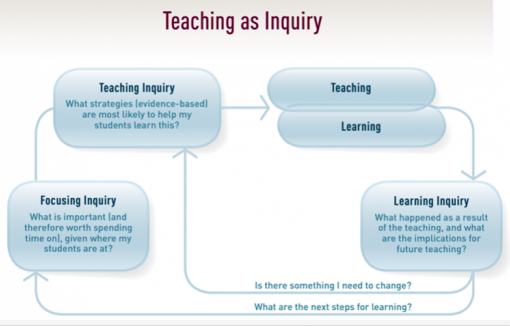
This is a place where I can reflect on my Teaching as Inquiry goals
and how they link to the Education Council's
Subscribe to:
Posts (Atom)